

One workspace for your whole AI team.
Hire teammates, give them knowledge and tools, set their rhythm, and review what they bring back — in one place, on the web, iPhone and Mac.
Mia Personal Assistant
MainToday
Dana at Northwind asked about renewal terms. Draft a reply from our 2026 price sheet.
Eight parts, one workspace. Click any part to go deeper.

Click any part on the ring to see it here.Tap any part above to see it here.
TeammatesA team in the sidebar, each with a job.Every teammate has a name, a job title and a lane. A spinning arc means it’s working; a cyan dot means there’s something new. Pin the ones you use most — pins carry over to the iPhone and Mac apps.See teammatesThe real workspace. Not a mock-up.
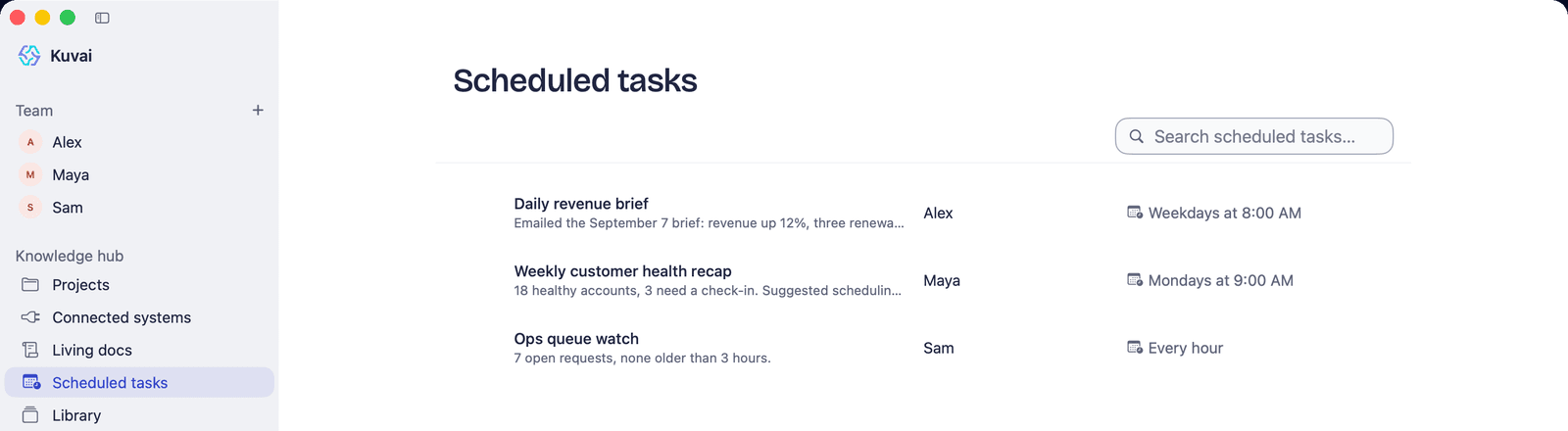
Screens from Kuvai with a sample team: a teammate's chat with its scheduled tasks and artifacts alongside, a project, and every recurring job on one page.
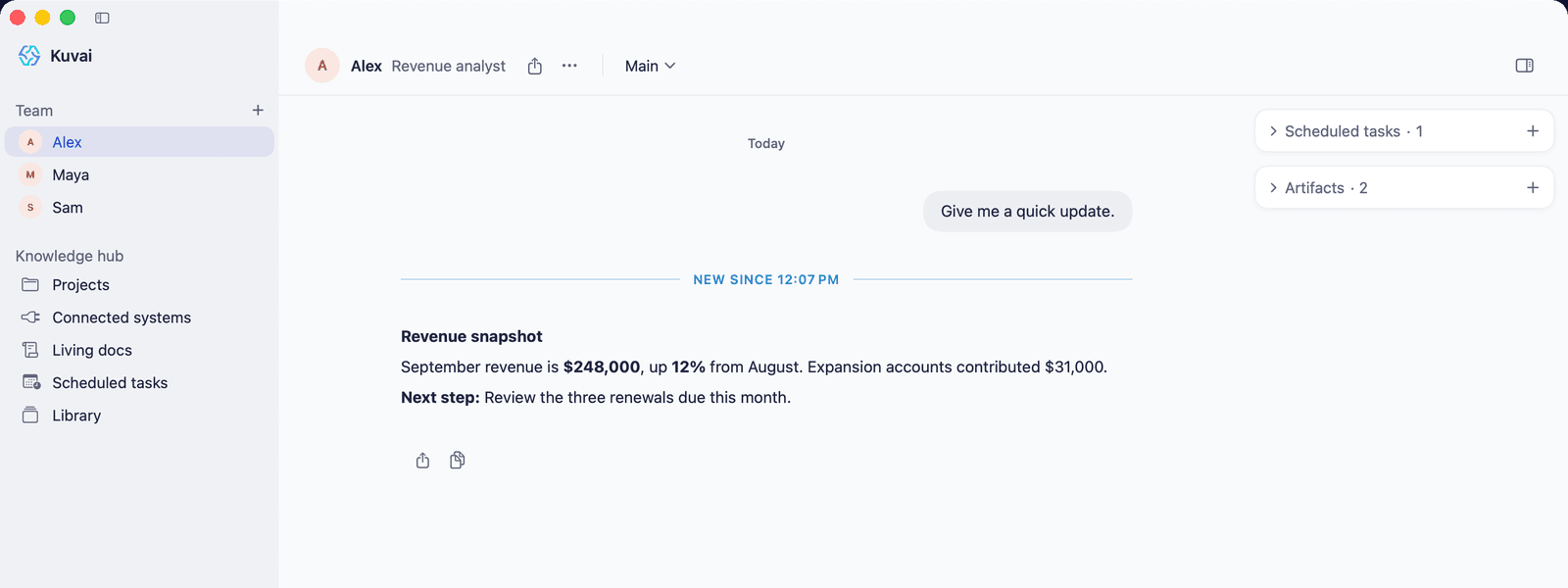
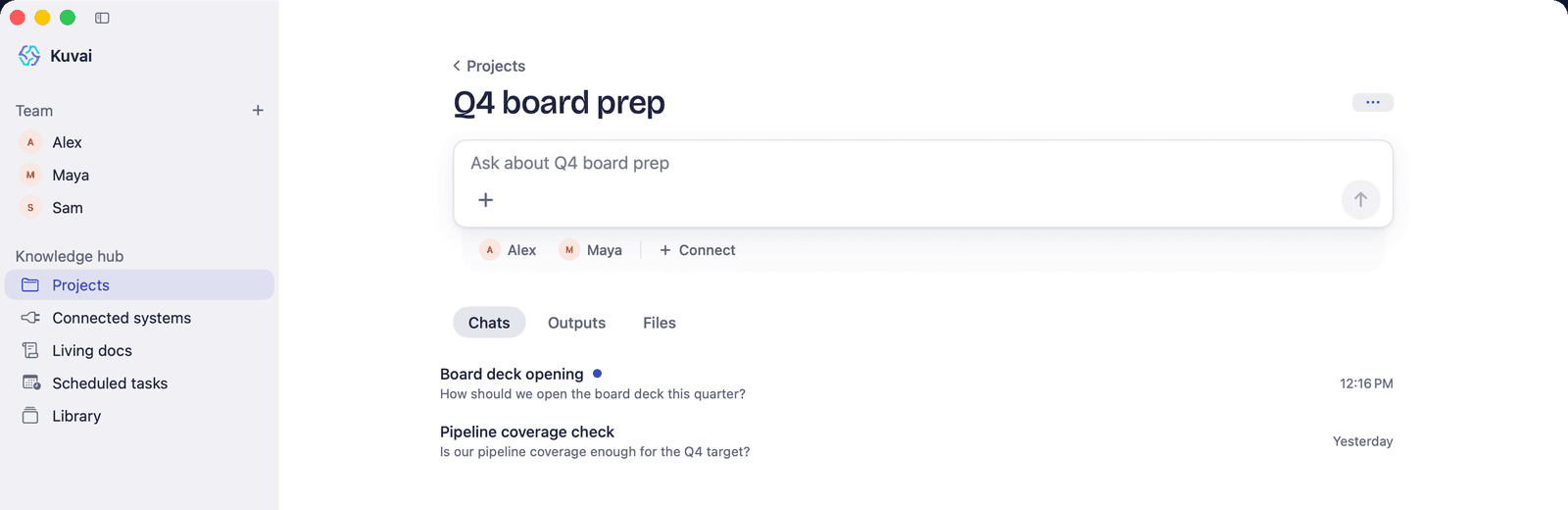
A team in the sidebar, each with a job.
Every teammate has a name, a job title and a lane. A spinning arc means it’s working; a cyan dot means there’s something new. Pin the ones you use most — pins carry over to the iPhone and Mac apps.
Browse teammates by departmentTeam
Records that keep themselves current.
Trackers, briefs and logs a teammate maintains over time — narrative sections and tables it works through on schedule. One teammate’s living doc can ground another’s work.
More on living docsQ4 renewals tracker
Ava · Updated Oct 27
Summary
Four accounts in play, $41,300 total. Northwind is the only renewal with a draft out; Pike & Rowe is blocked on their legal review.
Accounts
4 rows
| Account | Type | Value | Next step |
|---|---|---|---|
| Northwind Co. | Renewal | $18,400 | Draft sent Oct 27 |
| Halden Studio | Expansion | $6,200 | Call booked Oct 30 |
| Pike & Rowe | Renewal | $11,900 | Waiting on legal |
| Corvid Labs | New | $4,800 | Follow up Nov 3 |
Every recurring job, on one page.
Ask a teammate to do something “every weekday at 8” and it appears here, with the last result and the next run. Up to 25 per teammate.
More on scheduled tasksScheduled tasks
Brief it once.
A private notebook per teammate — about you, your standing preferences, the conversation so far, and informal notes — read on every turn. Long conversations are summarised, not dropped.
How memory worksAva’s notebook
About the User
Runs a 9-person design studio. Prefers bullet summaries before 9 AM.
Standing Preferences
Reports go to Dana, not Taylor. Never chase invoices under $200.
Conversation Memory
Oct 14–27: Q4 renewals; Northwind wants 12-month terms; Halden call booked.
Informal Notes
Pike & Rowe’s legal team is slow — check in every Thursday.
Illustrative. Written by the teammate; read every turn.
Forward it. Mia takes it from there.
Your Personal Assistant has its own Kuvai address. Forward anything and it gets answered, worked out, or handed to the teammate whose job it is; the outcome waits in Mia’s Inbox. Your assistant only works on mail from addresses you connect — your sign-in email plus up to 4 more.
Meet MiaYour Kuvai address
t••••••@••••••.com
CopySend or forward anything — Mia takes it from there.
- Fwd: Invoice #4471 — Brightline Supplyyou@company.comAwaiting response
- Fwd: Renewal terms?dana@northwind.coDraft ready
- Board deck — can you tidy slide 4?you@company.comDone
Inside the platform
The surfaces your teammates work across
Every teammate works in one workspace — shared projects, living documents, your connected tools, scheduled runs, and a memory that builds over time.
Projects
Shared context
Group files, chats and teammates around a piece of work, so everyone on your team is working from the same context.
Files, chats, artifacts and teammates in one shared context
Per-project chat and instructions
Workbench: extract insights, due diligence, presentations
Files
Chats
Teammates
Living documents
- Work that stays current
- Documents and tables your teammates maintain — updated as the work changes, not left to go stale.
- Self-updating documents and tables
- Maintained by your teammates as the work changes
- Docs
- Tables
- Auto-updated
Connected Systems
Connect virtually any tool you use
Connect virtually any tool your team already uses — your CRM, email, docs, calendar, project tools and more — securely, and only with your approval.
Connect virtually any tool your team uses — via OAuth, with your approval
A teammate only acts in the tools you connect, and only where you allow
Gmail
Salesforce
Slack
+ more
Uploaded files
- Grounded in your knowledge
- Upload your documents and your teammates work from them — your knowledge, not generic AI.
- CSV, XLSX, PDF, DOCX, PPTX, text and image OCR
- Vectorised for grounding (up to 150 MB per file)
- Docx
- Sheets
- Slides
Scheduled tasks
- Runs on its own
- Set work to run on a schedule, so the recurring jobs handle themselves without being asked every time.
- Recurring or triggered runs
- Pre-flight capability check before each run
- Hourly
- Daily
- Weekly
Memory
- It remembers you
- Every teammate accumulates your preferences and context as it works — day 60 is more useful than day 1.
- A per-teammate notebook
- Accumulates your preferences and context over time
- Preferences
- Context
- Patterns
Built to compound
Teammates that get more useful the longer they work with you
Most AI starts cold every time. A Kuvai teammate builds operating context over time — so the more it works with you, the less you have to repeat yourself.
Work a teammate starts on its own is checked against its autonomy level: destructive changes are proposed to you first, and every decision is logged.
Memory
Each teammate keeps a private notebook of how your business works — your preferences, your systems, your standing rules, and summaries of past work. It doesn't reset between sessions, so you stop re-explaining the basics.
Curiosity
When you introduce a new project or connected system, a teammate can take a quick, read-only look, note the essentials, and use that context next time — getting oriented without a full tour. Bounded and opt-in.
Daily reflection
After completed work, a teammate reviews how it went, captures durable facts, and proposes refinements to its own instructions — which you approve. It improves at your recurring work instead of repeating the same miss.
Autonomy
You choose how independently each teammate acts — read-only, draft-first, or trusted with in-lane work. Authority you grant deliberately; work it starts on its own is checked against that level, and every decision is logged.
Autonomy you control — four levels
- Match a teammate's authority to the work and the trust it has earned. Most teams start at Propose.
- Observe
- Watch only — no auto-runs, no proposals. Maximum control for evaluation or sensitive work.
- Propose
- Reads and explores on its own, but asks before any change. The default.
- Act
- Creates new in-lane work on its own, but asks before changing anything you've already touched.
- Lead
Build a teammate
No code. No config screens. Just describe the job.
You build a Kuvai teammate the way you'd brief a new hire — in plain language. Kuvai suggests a role and the tools it needs, you ground it in your documents and connect your systems, and it starts working. The same flow, at two speeds: start from a ready-made role or build one from scratch.
No credit card required · Free to start · Cancel anytime
What should your team member do?
Build a teammate
What does it mean to build an AI teammate, and do I need to code?
Building an AI teammate on Kuvai means describing a job in plain language and getting a colleague built around it — grounded in your documents, connected to your tools, and running on a schedule. There is no code and no workflow to wire up.
This is the opposite of how most AI tools work. A no-code automation platform makes you draw a flowchart of triggers and actions; a chat tool makes you re-explain your business every session. Kuvai's build flow takes a sentence — "keep my pipeline reviewed and flag deals that have gone quiet" — and assembles a teammate with the right role, the right connected tools, and a place to ground it in your data. Ready-made roles and the from-scratch path are the same flow at two speeds: start from a shared role link, or describe something entirely your own.
The wedge: simpler than building automation (Zapier / Make / n8n), more capable than chatting with AI (ChatGPT / Copilot) — and built around your business, not someone's template.
What is an AI agent platform — and why does Kuvai build teammates instead?
An AI agent platform is software for standing up AI that takes real actions, not just answers questions. Most of them ship predefined agents for generic tasks, and you bend your process to fit the template. Kuvai is an AI agent platform in that sense — but built around the opposite idea: instead of adapting to a bot, you describe a job in plain language and get an AI teammate created around it, grounded in your own documents and connected to your tools. We call them teammates, not agents, because they own a job and adapt to how you actually work.
For a growing team, that distinction matters more than the label. A generic AI agent is quick to start but rigid, stateless, and unaware of your business; a Kuvai teammate handles the variation and exceptions a template can't, accumulates your context so it gets more useful over time, and goes as far as you ask, with every step shown. So if you're evaluating AI agents for your business, the real choice is a template you adapt to versus a teammate built around you — which is why our comparison of Kuvai vs predefined AI agents, and the AI agent definition in our glossary, both land on the same conclusion: for an SMB, a teammate is the better model.
Most AI agent platforms hand you a template to adapt to. Kuvai builds a teammate around your job — grounded, governed, and yours.
How do you build a teammate? The five-step flow.
No templates to wrestle, no code. Tell Kuvai what you need done, connect the tools it should use, point it at the data it should know — and your new teammate gets to work.
Describe the job
In your own words. Kuvai suggests a role and the tools it will need, or you start from scratch.
Identity & style
Name the teammate, give it a persona, and set the tone of voice it should write in.
Connect tools
Plug in the systems it should work in — your tools, connected securely and only with your approval.
Ground its data
Give it the documents and context it should rely on, so it works from your knowledge, not generic AI.
Add to your team
Confirm, and your new teammate can start on a first piece of work — then run on a schedule and surface what matters.
You can also start from a shared teammate link, which prefills a ready-made role for you — ready-made roles and custom creation are the same flow at two speeds.
Why build a teammate instead of wiring up automation?
Building automation (Zapier / Make / n8n)
- You design the logic: every trigger, every branch, every action, by hand.
- It does exactly what you wired — and nothing it wasn't told to.
- No judgement: it can't read a document and decide what's missing.
- Breaks silently when an input changes shape.
- You maintain the flow forever.
Building a Kuvai teammate
- You describe the outcome; Kuvai assembles the teammate around it.
- It owns the job end-to-end and handles the variation, not just the happy path.
- It reads, checks against your documents, and exercises judgement.
- It accumulates your context — more useful on day 60 than day 1.
- You decide how far it goes. Every step shown, with its sources.
Automation is for deterministic plumbing. A teammate is for the judgement work — reading, checking, drafting — that rules can't capture.
What can you build? Teammates people create on Kuvai.
Each starts from a one-sentence job and is built around your business — technical, revenue, or operational. These are some of the roles teams build most often.
Personal Assistant
- Reads forwarded email and attachments
- Checks them against your documents
- Drafts the reply
Sales Coordinator
- Watches the pipeline
- Flags deals gone quiet
- Keeps the CRM current
Product Manager
- Synthesises scattered feedback, drafts PRDs, and tracks whether a release landed
SEO & Analytics
- Tracks rankings and traffic and drafts your monthly SEO and analytics report
Project Manager
- Flags stalled tasks and project risk, and drafts status updates from your boards
Bookkeeper
- Pulls the numbers
- Flags what moved
- Hands you a monthly P&L to review
Don't see the role you need? Describe it — Kuvai builds the teammate around the job, not a template.
What does a built teammate do on day one?
Mortgage & Lending: an overnight document desk
A broker describes the job: "check every borrower package against our file requirements and chase what's missing." The built teammate processes 40 documents that arrived overnight, returns an 11-point completeness check per file, and queues a draft chase-email for each borrower.
Insurance: renewal comparison on a schedule
An agency builds a teammate to compare each renewal against the prior term and the client's coverage needs. It surfaces every changed limit, dropped endorsement and premium delta, and drafts a plain-English client summary.
Customer Support: grounded first-pass replies
A support lead describes a triage-and-draft job. The teammate is grounded in the product docs and policies, drafts answers accurate to the company's actual terms, and routes genuinely novel tickets to a human.
Professional services: docs that stay current
A PM builds a Knowledge Manager to keep the team's process docs in sync with how work actually ships, on a weekly schedule, instead of letting them rot between projects.
Finance: a monthly close that runs itself
A founder builds a Bookkeeper to categorise transactions, reconcile accounts and draft the monthly P&L from the month's documents — every figure queued for review before anything is filed.
Sales: a pipeline that stays current
A sales-led founder builds a Sales Coordinator to watch the pipeline, flag deals stalled too long, and draft the next follow-up — so nothing slips between calls and meetings.
Every teammate is grounded in your documents and stays in its lane — out-of-scope work is flagged, never guessed.
Related terms: AI agent · Agentic AI · AI teammate · AI workforce · Grounding (AI) · Compounding delegation · AI memory · Self-learning AI · AI autonomy
Built to be trusted with real work
The guardrails and transparency that let you hand a teammate real work — the controls that are actually in place.
You decide how far it goes
Ask for drafts and you get drafts; ask it to act and it acts. Work a teammate starts on its own — scheduled runs and follow-ups — never makes destructive or out-of-lane changes without checking with you first.
Each teammate stays in its lane
A defined job with clear boundaries. Anything outside its lane never runs on its own — it's flagged to you, never guessed.
Everything is on the record
Every reply shows the steps it took and the sources it used, and every decision on work a teammate starts on its own is logged.
Your data is scoped to you
Files, projects and outputs are scoped to your account. A teammate only works with what you give it.
You approve every connection
Tools connect through explicit OAuth approval — a teammate only works in the tools you've connected and assigned to it.
LLM-agnostic
Runs on leading models from providers such as OpenAI, Anthropic and Google — not locked to a single model.
Building a teammate — common questions
What’s in a Kuvai workspace?
Teammates (including Mia, your Personal Assistant), Projects to scope knowledge, Connected systems, Living docs, Scheduled tasks and a Library of everything teammates produce and you upload.
What are projects?
A project is a scoped bundle of files, chats, outputs and instructions. Connecting a teammate to a project keeps its work, and the context you give it, in one place.
Where does a teammate’s work show up?
In its chat, in the side pane’s Artifacts and Scheduled tasks cards, in living documents, and in the Library. In the iPhone app you also get a push when work finishes.
What are AI agents for business, and how is a Kuvai teammate different?
AI agents for business take actions for you: answering, processing, following up. Most are built for one generic task. A Kuvai teammate is built around your job from a plain-language description, grounded in your company profile and files, and goes as far as you ask.
What's the best AI agent platform for a small business?
One that’s simpler than building automation, more capable than chatting with AI, and built around your business instead of a template. That’s the gap Kuvai is built for: name a job, ground it in your company, connect your tools, and the teammate runs on a schedule.
Do I need any technical skills to build a no-code AI teammate?
None. Give it a name and a job title, connect the tools it needs in their own sign-in windows, and ask for work in plain language. Kuvai writes its duties and working rules.
Are no-code AI agents worth it for a small business?
When they fit your actual work. Generic no-code agents are built for a template; a Kuvai teammate gets the same no-code setup but works from your own company profile, files and rules, and handles the messy middle in language.
How is building a teammate different from a Zapier or n8n workflow?
Automation tools run if-this-then-that logic you design and maintain. A teammate handles judgment work, such as reading a document, deciding what’s missing and drafting a reply. You describe the outcome instead of drawing the flowchart.
What tools can a teammate connect to?
Kuvai offers 1,000+ connectors through Connected systems, including Gmail, Google Drive, Slack, HubSpot, Salesforce, Notion, Jira, QuickBooks and Stripe. You sign in to each in its own window and assign it to the teammates that need it.
How does a teammate learn my business?
It starts from a company profile Kuvai drafts from your website, plus the files you upload and the projects you connect it to. It keeps a private notebook of your preferences, and a daily reflection proposes refinements you approve.
Where should I start?
With Mia, the Personal Assistant on every account: start by forwarding an email. Then name the job you most want off your plate and Kuvai builds a teammate around it.
Can teammates work together?
Yes. A teammate can hand part of a task to another — up to two levels deep — and living documents let one teammate’s output ground another’s.
Describe the job. Get a teammate built around it.
Describe the job. Kuvai builds the teammate. You decide how far it goes.