

Say it once. It runs every Monday.
Ask in plain words — “every weekday at 8, summarise the pipeline” — and the teammate turns it into a scheduled task. Every recurring job, who owns it and what it found last, on one page.
Scheduled tasks
Recurring work, off your list. And on one page.
Set up in a sentence
Say what and when in chat. No cron syntax, no workflow builder, no triggers to wire.
Up to 25 per teammate
Each teammate can run up to 25 active scheduled tasks, as often as hourly.
Four kinds of job
Watch something and flag changes, send a digest, produce a deliverable, or react when something happens.
Every job on one page
Scheduled tasks lists every teammate's jobs with the owner, the cadence, the last result and the next run — paused ones too.
Runs once, on time
Due tasks are claimed once, so a run can't double-fire, and paused or retired teammates are skipped.
Failing jobs pause themselves
A task that fails 3 times in a row is paused and flagged instead of running on.
You hear when it's done
Results land in the teammate's chat and its living docs. The iPhone app sends a push; the Mac app shows a notification.
Better at the job over time
Each run is checked, and after five runs the teammate proposes a better way to do the job for you to approve.
How it works
From a sentence to a standing job.
- 1In a teammate's chat, say what and when — “every Friday at 9, list invoices more than 30 days overdue”.
- 2It confirms the schedule and adds the task to Scheduled tasks.
- 3At each run it reads the tools you connected, does the work and writes up what it found.
- 4The result lands in chat and in the living doc it keeps; set up as drafts, anything outgoing waits for you.
- 5Change the timing or the job any time by asking in chat.
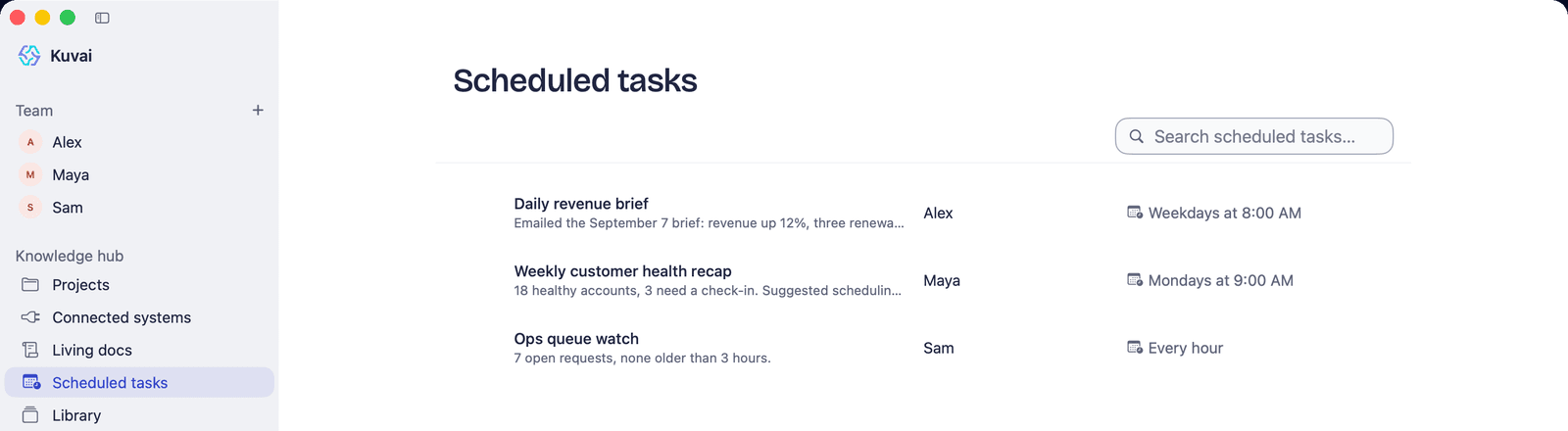
See it on a real job. Step by step.
The rest of the Knowledge Hub. It works together.
Questions, answered
How do I schedule a task?
Ask in a teammate's chat in plain words — “every weekday at 8, summarise the pipeline” — and it turns that into a scheduled task. There's no cron syntax or workflow builder.
How many scheduled tasks can a teammate run?
Up to 25 active scheduled tasks per teammate, as often as hourly. Every one is listed on the Scheduled tasks page with its last run and next run.
What happens if a scheduled task keeps failing?
After 3 failed runs in a row the task is paused and flagged instead of running on, so a broken connection doesn't burn credits or fill a chat with errors.
Can a scheduled task act without asking me?
Work a teammate starts on its own is checked in code against its autonomy level: at the default, additive in-lane work runs, destructive changes are proposed to you, and out-of-lane actions don't run on their own. Set the job up as drafts and anything outgoing waits for you.
Do scheduled tasks use credits?
Yes — a run uses credits for the time the teammate spends working, like any other work. One credit is 3.6 seconds of model working time.
Your team is one teammate away.
Describe the job. Kuvai builds the teammate. You decide how far it goes.